
2025 · AI · B2B · Construction Tech · iOS/Android
Assist Chatbot: Mobile AI Support for the Jobsite

Problem
Procore had a support cost problem and a support discoverability problem, and both were getting worse. Customers had too many ways to get help across the platform with no clear signal on which to use, so they defaulted to live agents even for issues already documented in Procore's knowledge base. 70% of Level 1 tickets were resolved by content a rep simply read aloud or linked. The support org represented ~$22M in annual spend (1.8% of revenue), and the model didn't scale.
Mobile was where this hit hardest. Field users had three competing paths to get help (live chat, phone, and email), and the most common entry point, "Report App Issue," sent diagnostic data into a black box with no visible follow-up. 3,284 mobile cases came in during Q1 2025 alone, spanning login, daily logs, photos, drawings, uploads, and admin. Many users abandoned the flow entirely or escalated through office staff, which was inefficient and costly for everyone involved.
Challenge
As lead designer on the mobile MVP, I had to deliver a self-service chat experience that worked for jobsite realities (noise, interruptions, split attention, and spotty connectivity) while building on top of Procore Assist, the company's new conversational AI platform. The system needed to feel trustworthy in a field environment where users have no patience for vague or wrong answers, hand off cleanly to human agents when AI fell short, and ship fast enough to prove deflection value before the broader Assist roadmap caught up.
Solution
I designed a mobile-first chat experience anchored on three goals:
(1) A clear entry point. A new AI support entry point in the bottom navigation replaces the ambiguity of three competing channels with one obvious starting point.
(2) Guided, context-aware conversation. Pre-loaded suggestions tied to the user's current page or to the most common mobile issues (login, upload queue) get users unstuck faster than a blank input field.
(3) A warm handoff, not a dead end. When AI can't resolve the issue, the chat surfaces human channels and auto-summarizes the conversation into the Report a Problem form so users don't retype, and so support reps inherit full context the moment a case lands in Salesforce.
Impact
The MVP reached 100+ beta customers and reduced support volume by 13% on average, proving the deflection model worked in the field. Procore's acquisition of Datagrid then shifted the roadmap. Rather than push to GA on the original infrastructure, the team is rebuilding Assist on Datagrid's AI stack, carrying the validated patterns and design system forward.
Press
Procore announced Assist's mobile capabilities at Groundbreak 2025 as part of its broader AI strategy, bringing on-demand support to customers working in the field.

Role
Lead designer
Platform
iOS/Android
Timeline
3 Weeks
Skills
Strategy, Product design
Team
1 Product manager
1 Engineer manager
6 iOS/Android engineers
Tools
Figma, Cursor, Expo, Jitter
Validating AI Support with Customers
I led moderated interviews with five customers across general contracting and project management roles, walking them through demos of the proposed AI support experience to test whether the direction would hold.
Before
Procore iOS App
After
Cursor Prototype
Customer Feedback
Moderated Interviews

(1) AI as a first step, not a replacement. Every interviewee wanted to try AI first and reach a human if it failed. The escalation path wasn't an edge case, it was core to the value.
"My ideal support experience would be to first try Assist for answers. If that doesn't work, then seamlessly transition to a live chat."
Project Coordinator, Earth Max

(2) Trust hinges on the first answer. Customers were clear that AI gets one shot. A vague or wrong response means they're back to live chat and unlikely to return.
"For AI to succeed, it must be productive from the first try. Users need accurate results quickly to avoid live chat."
Project Manager, RBmarks Construction

(3) Speed beats warmth. Customers preferred AI over live chat for routine issues because waiting wasn't realistic during work.
"AI is way better. People don't want to read huge support pages. AI gives you the answers faster, and is less time consuming than live chat."
Operations Manager, P&C Construction
Designing for AI as a Material
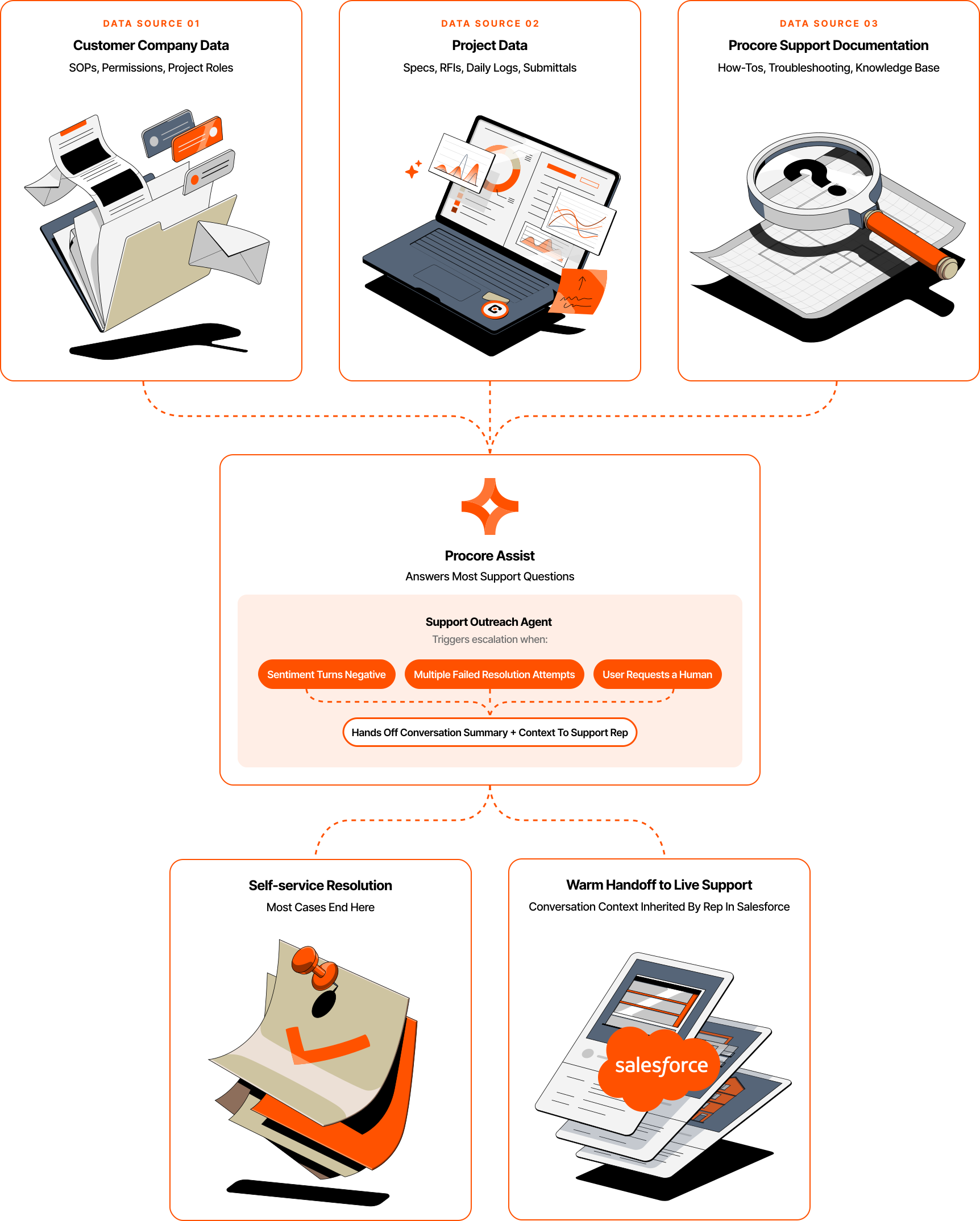
Designing on top of an AI platform meant treating the system itself as a design problem. Three things shaped the work: how Assist sourced its answers, how the underlying patterns worked, and how I architected the agent that decides when to bring a human into the loop.
Architecting the Support Outreach Agent
Assist could answer most support questions on its own, but the harder design problem was deciding when to stop trying. I architected the Support Outreach Agent's information architecture: the layer that determines when a conversation should escalate to live support and what context should follow the user when it does.

The agent triggers escalation under three conditions:
- Negative sentiment in the conversation
- Multiple failed resolution attempts
- Direct request to speak with a human
Assist grounds its answers in Procore's documentation rather than the model's training data (RAG), which is why it can cite sources and treat "I don't know" as a designed state instead of a failure. Its step-by-step reasoning (ReAct) is what lets the agent summarize its own logic when escalating, so reps inherit context instead of a raw transcript.
Exploring Entry Points
Where Assist lived would decide whether field users could find it the moment they got stuck, so I treated the entry point as its own design problem. After studying how Amazon Rufus, Gemini, and Notion AI each handle AI placement, I explored three options for Assist: bottom navigation, top navigation, and a floating action button. Each struck a different balance between discoverability and staying out of the way.

Why bottom navigation
The team initially favored top navigation for its always-visible consistency, but bottom navigation is what shipped for the beta. It was the most feasible for engineering to build in time for Groundbreak, gave field users the fastest path to support, and matched executive leadership's vision for Assist as a prominent part of the app.
Positioning Assist as a main feature had been a mark against bottom nav, but as strategy clarified, that prominence became the point. Customer testing de-risked it: 100% of users understood the sparkle icon.
A Component Library for Assist
Assist needed to ship fast for Groundbreak and stay consistent across phone and tablet, iOS and Android, light and dark themes. I built a dedicated Assist sub-library inside Procore's Mobile Library, with each component inheriting the foundational tokens (color, type, spacing) from Procore's Core Mobile Design System.

Assist's beta validated the bet on AI support, with patterns built to carry into Procore's next chapter.
100+
Customers reached during beta.
13%
Reduction in support volume.